
Salesforce Lead Routing & Round Robin
Lead Assignment — No Code Required
AssignMate automates Salesforce lead routing and lead distribution with true round robin lead assignment — weighted, availability-based, or perfectly even. No code, no Apex, no admin ticket. Every lead reaches the right rep in seconds.
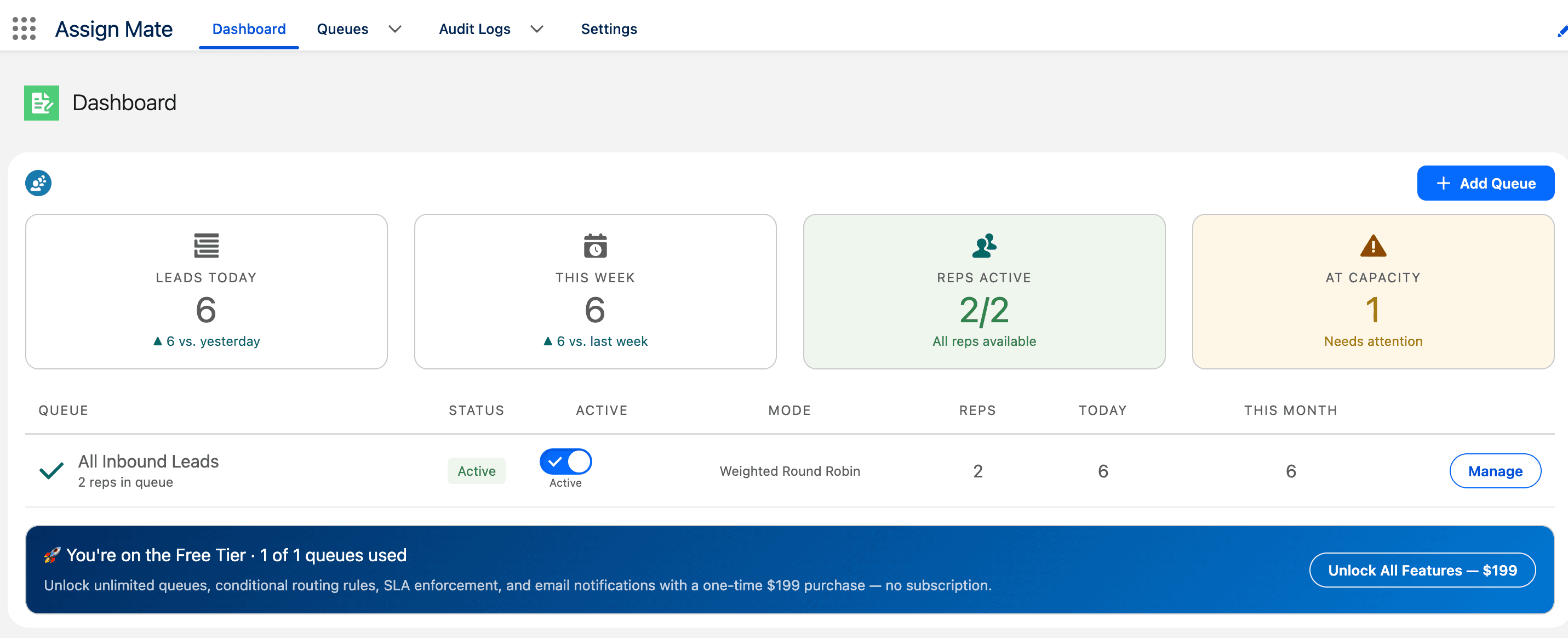
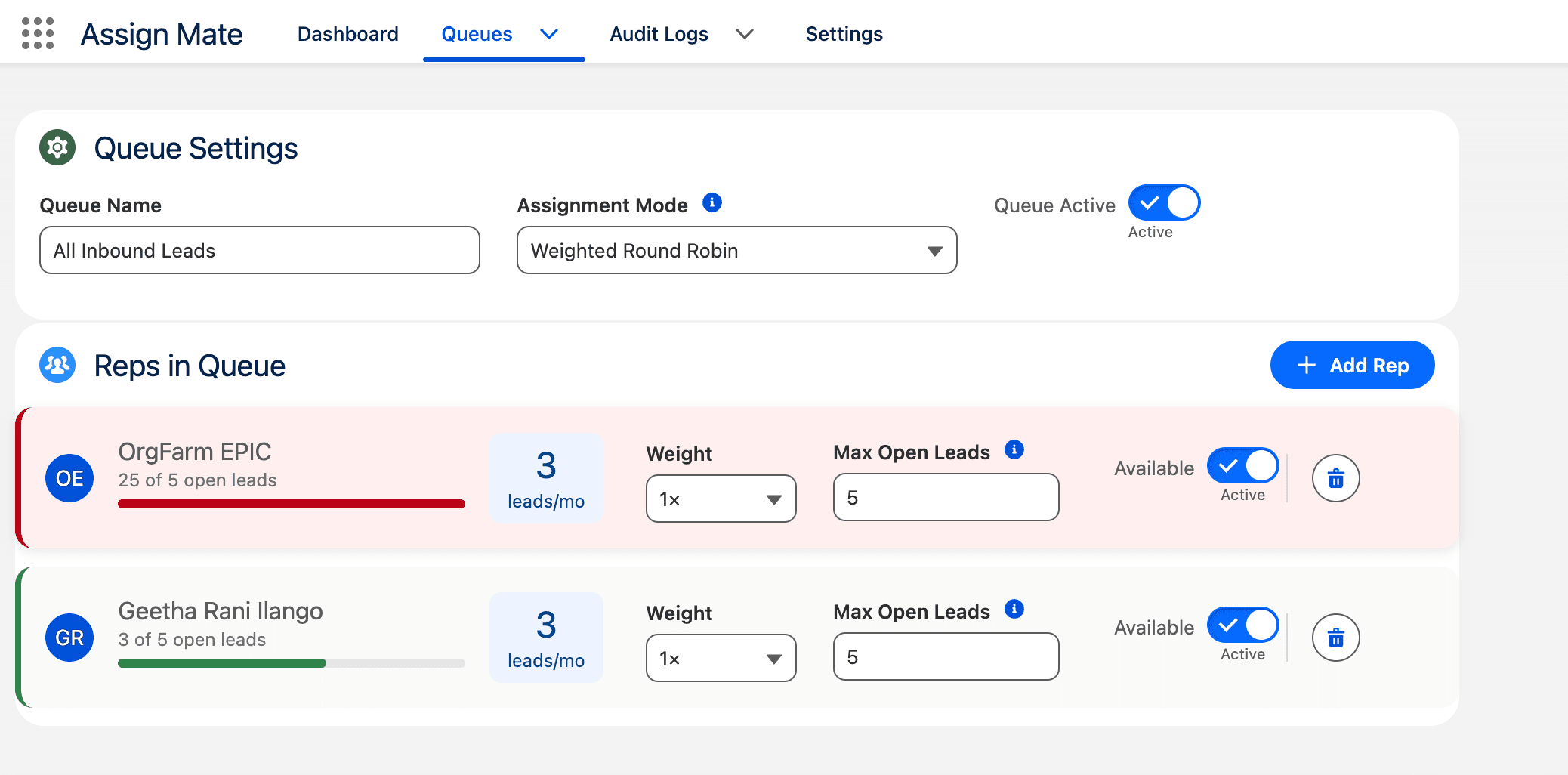
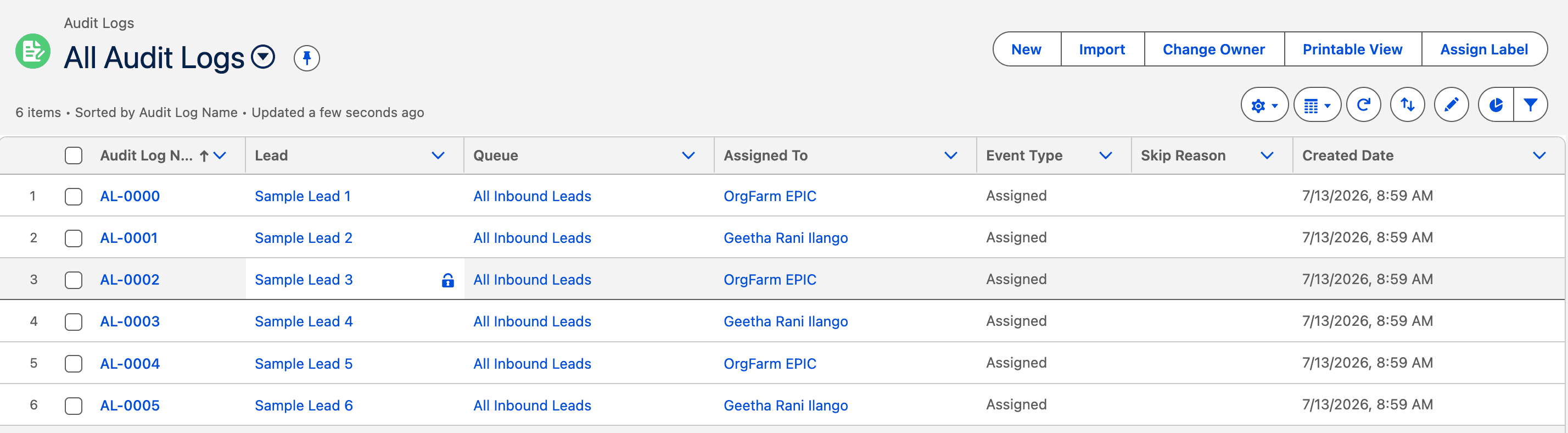
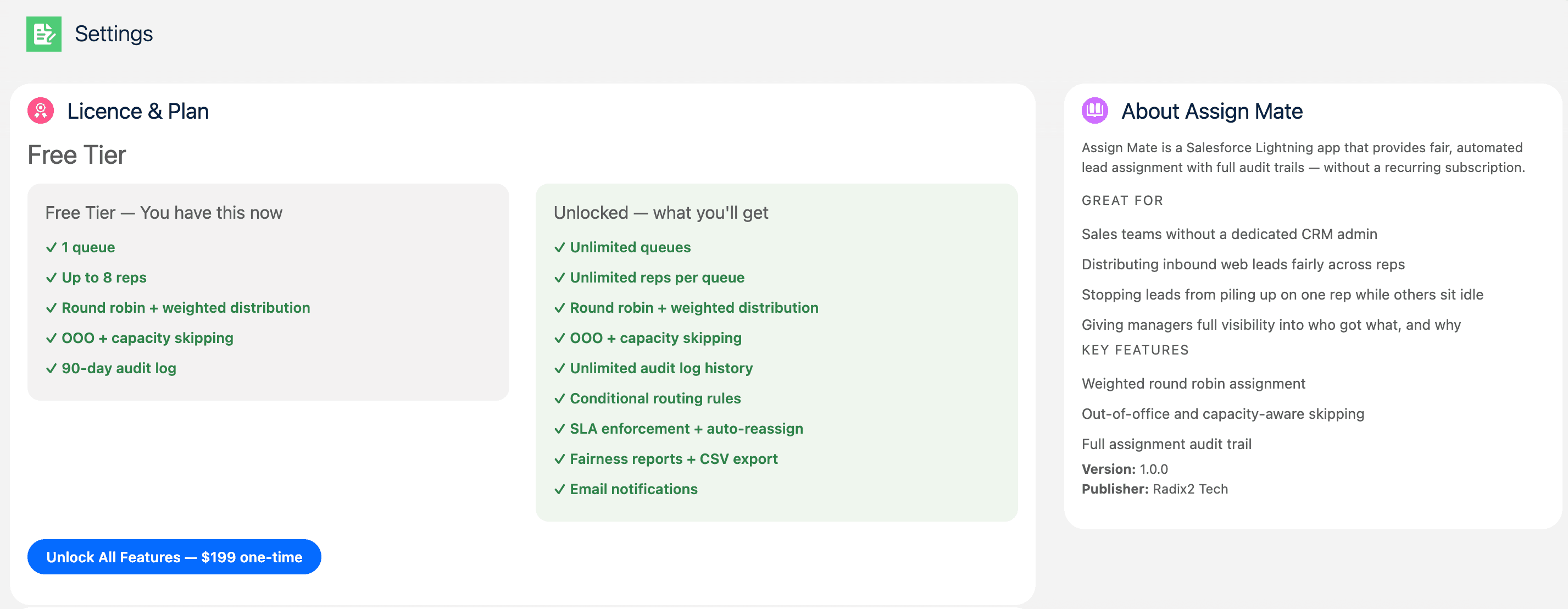
Dashboard — live view of lead volume, rep availability, and capacity alerts
Your reps are fighting over leads — or nobody is following up at all
Salesforce's native lead assignment rules let you route records to a queue based on criteria — but they don't rotate. There's no real Salesforce lead routing automation built in. That means:
- ✕Managers manually forwarding leads from a shared queue every morning
- ✕Top reps cherry-picking the best leads while others sit idle
- ✕New leads sitting unassigned for hours because nobody claimed them
- ✕Zero audit trail — no way to prove who got what or when
- ✕Your CRM data is wrong because assignment history lives in Slack DMs
AssignMate solves this in under 10 minutes — no developer required.
One rep buried. Others idle. Nobody happy.
Round robin. Every rep gets a fair shot.
Everything you need for Salesforce lead routing automation and fair lead distribution
Round robin lead assignment built for teams of 3–50 reps. Automate Salesforce lead routing and lead distribution for Leads, Cases, Opportunities, or any Salesforce object.
True Round Robin Assignment
New leads are automatically assigned to the next rep in rotation the moment they're created. No manual routing, no dropped leads.
Weighted Distribution
Give any rep a 0.5×, 1×, or 2× share of incoming leads — perfect for ramping new hires or rewarding top performers. No admin needed to adjust.
Out-of-Office Awareness
Reps mark themselves unavailable in one click. The rotation skips them automatically and picks up right where it left off when they're back.
Capacity Limits
Cap how many open leads a rep can hold at once. Once they hit the limit, new leads route to the next available rep automatically.
Full Assignment Audit Log
Every assignment, skip, and reassignment is logged with timestamp, rep, queue, and reason. 90 days of history on the free tier, unlimited on paid.
No-Code Queue Builder
Sales managers create and manage queues entirely from the Lightning UI — add reps, set weights, set capacity, pause a queue. Zero Apex, zero Flow, zero admin required after install.
Live Queue Dashboard
One screen showing every queue's health: assignments today, reps at capacity, reps OOO, and week-over-week trends — always current.
Enterprise-Grade Reliability
Bulk-safe, governor-limit-safe Apex built to handle 500+ leads/day without dropped or duplicate assignments. 100% native — no external servers, no third-party APIs.
Set up Salesforce lead routing in 10 minutes. No code, no admin ticket.
Three steps from install to fully automated round robin lead assignment.
Install the package
One install link, no Setup configuration required. Takes under 10 minutes. Additional managers are added in-app — not through Salesforce Setup.
Build your queue
Open the AssignMate Lightning app, create a queue, add your reps, set weights and capacity limits — all from the Lightning UI, no Apex or Flow needed.
Turn it on
Activate the queue. Every new record from that point is automatically routed to the next available rep in rotation — you're done.
What happens after I click install?
- Salesforce installs the package (under 2 minutes)
- Open the AssignMate app from the App Launcher
- Create your first queue — add reps, set weights
- Activate — round robin starts immediately
No Setup config. No permission sets to hunt down. No code to write.
Built for sales managers who need Salesforce lead routing — not a developer
AssignMate is designed for the person who owns the sales pipeline — not the person who owns Salesforce. If you manage 4–50 reps and you are tired of being the human router, this is for you.
- Sales ManagerStop manually distributing leads every morning.
- VP of SalesEnsure every rep gets a fair shot. Track who got what.
- RevOps / Sales OpsAutomate lead routing without building a Flow or hiring a developer.
- Salesforce AdminDeploy in minutes. No custom code to maintain or debug.
Leads route automatically every morning. No Slack DMs, no shared queue babysitting.
Full audit trail. See every assignment, rep load, and skip reason — in real time.
No Apex, no Flow, no dev ticket. Build the queue yourself. Change rules anytime.
Unmanaged package. No triggers, no flows to debug. Upgrade or uninstall cleanly.
AssignMate vs. Salesforce native lead routing rules
Salesforce's native lead routing rules are criteria-based — they don't rotate or distribute fairly. Here's how AssignMate's round robin lead routing compares to Salesforce's built-in assignment rules.
| Feature | Native Salesforce Rules | AssignMate |
|---|---|---|
| Round robin rotation | ✕ | ✓ |
| Weighted distribution | ✕ | ✓ |
| OOO / availability toggle | ✕ | ✓ |
| Capacity limits per rep | ✕ | ✓ |
| Assignment audit log | ✕ | ✓ |
| Manager self-serve changes | ✕ Admin only | ✓ No admin needed |
| Works for any Salesforce object | ✓ | ✓ |
| Cost | Free (included) | Free / $199 one-time |
| Setup time | 30–60 min | 10 min |
AssignMate vs. enterprise lead routing tools
LeanData, Chili Piper, and Distribution Engine all offer Salesforce lead routing — but they are built for enterprise sales orgs with 6-figure software budgets. AssignMate gives you the same round robin lead assignment for a one-time $199, with a 10-minute setup instead of a 6-week implementation.
| Feature | AssignMate | Distribution Engine | Chili Piper Distro | LeanData |
|---|---|---|---|---|
| Pricing | Free / $199 one-time per org | ~$20–$55 /user /mo | ~$30–$45 /user /mo | ~$39–$59 /user /mo (contact sales) |
| Free plan | ✓ Forever (1 queue, 8 reps) | ✕ 30-day trial only | ✕ No free plan or trial | ✕ No free plan |
| True round robin | ✓ | ✓ | ✓ | ✓ |
| Weighted distribution | ✓ Paid plan | ✓ | ✓ | ✓ |
| OOO / availability toggle | ✓ Paid plan | ✓ Calendar sync | ✓ Calendar-aware | ✓ Full availability rules |
| Assignment audit log | ✓ Paid plan | ✓ Full history + response time | ✓ Per-record log | ✓ Full routing history |
| No-code setup | ✓ Manager-level | ✓ Admin-level | ✓ Admin-level | ✓ Admin + consultant recommended |
| Setup time | 10 minutes | Days to weeks | Days | Weeks (often needs a consultant) |
| Target team size | 3–50 reps | 10–500+ reps | 10–500+ reps | 200+ reps (enterprise focus) |
| Estimated annual cost (10 reps) | $199 (one-time, ever) | ~$2,400–$6,600 /yr | ~$3,600–$5,400 /yr | ~$4,680–$7,080 /yr (+ implementation fees) |
Pricing based on publicly listed rates as of July 2026. Enterprise tools may offer discounts at volume. AssignMate is the only tool with a free-forever plan and one-time pricing.
Thinking of building it yourself?
Don't spend 40+ hours building what's already done
A custom Apex round robin solution — even using AI tools — takes a senior dev 40–80 hours to build correctly (bulk-safe, governor-limit-safe, with an audit log and UI). That's $4,000–$8,000 in dev time. And you still own the maintenance.
AssignMate is already built, tested, and running in live orgs. Install in 10 minutes. $199 total. Never debug a trigger again.
Build it yourself
- 40–80 hrs dev time
- $4,000–$8,000 cost
- Ongoing maintenance
- No audit log by default
- You own the bugs
AssignMate
- 10 min install
- $199 one-time
- Updates included
- Full audit log built in
- We own the bugs
Simple pricing. No subscriptions.
Start free. Pay once when you need more. No monthly fees, ever.
No AppExchange fees · No monthly subscription · No Apex required
- True round robin assignment
- Weighted distribution (0.5×, 1×, 2×)
- Out-of-office awareness
- Capacity limits per rep
- Full audit log — 90 days history
- No-code queue builder
- Live queue dashboard
- 10-minute self-service install
- Everything in Free
- Unlimited queues
- Conditional routing rules (field-based)
- Cases, Opportunities & Contact support
- Any standard or custom object (no-code Flow)
- Email + push notifications per assignment
- Unlimited audit log history
30-day money-back guarantee. No questions asked.
Included in every tier — free and paid
Safe to install — no surprises
- Unmanaged package — you can inspect every line of code before installing
- No data leaves your Salesforce org — zero external API calls
- Uninstall in 30 seconds if it's not for you — no residue, no leftover config
- Works on any Salesforce edition with API access (Professional, Enterprise, Unlimited)
What teams say after switching to AssignMate
"We were spending 20 minutes every morning manually routing leads from a shared queue. AssignMate eliminated that entirely. Setup took under 10 minutes."
"The audit log alone was worth it. Now I can see exactly who got what lead and when — no more guessing or Slack threads."
"I tried building this in Flow three times over two years. Gave up every time. AssignMate just works, out of the box."
Salesforce Lead Routing & Round Robin Assignment — FAQ
Can you do round robin lead routing in Salesforce without code?
Yes — that's exactly what AssignMate does. Install the package (5 minutes), create a queue, add your reps, and activate. Round robin lead routing starts immediately. No Apex, no Flow builder, no admin ticket required. Any sales manager can set it up.
How is AssignMate different from Salesforce native lead assignment rules?
Salesforce's built-in assignment rules are criteria-based and static — they don't rotate. AssignMate adds true round robin rotation, weighted splits, OOO awareness, capacity limits, conditional routing, and a full audit log — all from a Lightning UI, no code required.
How do Salesforce lead routing rules work — and what are their limits?
Native Salesforce lead routing rules match leads to a queue or user based on criteria (e.g., State = California). They don't rotate — the same rep gets every matching lead. There's no round robin, no availability awareness, no audit log, and no weighted distribution. AssignMate fills every one of those gaps without touching code.
What is the best Salesforce lead routing tool for a team of 10–50 reps?
For teams of 10–50 reps, AssignMate is the most cost-effective option. Enterprise tools like LeanData ($39–59/user/mo) and Chili Piper ($30–45/user/mo) are built for 100+ rep orgs with matching/scoring needs. AssignMate gives you true round robin, weighted distribution, OOO toggle, and a full audit log for a one-time $199 — no per-seat fees, no annual contract.
How do I set up Salesforce lead assignment rules for round robin distribution?
Native Salesforce lead assignment rules can't do round robin — they route every matching lead to the same rep or queue. To get true round robin in Salesforce: install AssignMate, create a Lead queue, add your reps, and activate. The whole setup takes under 10 minutes.
How do I automatically assign leads to sales reps in Salesforce?
Install AssignMate → create a Lead queue → add your reps → activate. Every new lead is then automatically routed to the next available rep in rotation. The whole process takes under 10 minutes.
What happens when a rep goes on vacation?
The rep marks themselves unavailable in one click from the queue dashboard. AssignMate skips them immediately and picks up exactly where it left off when they return — no leads are lost, no manual re-queue needed.
Can I route leads to different queues based on field values?
Yes — conditional routing rules are included in the $199 paid unlock. Route records to the right queue based on any field value (e.g., Lead Source = "Demo Request" → Queue B), point-and-click, no code.
What is the $199 paid unlock exactly?
A one-time payment per Salesforce org. No subscription, no monthly fees, no seat-based pricing. Unlocks: unlimited queues, conditional routing rules, Cases/Opportunities/Contacts support, any-object routing, email + push notifications per assignment, and unlimited audit log history. The free tier stays free forever.
Is AssignMate safe for high lead volume?
Yes. AssignMate is built on bulk-safe, governor-limit-safe Apex designed to handle 500+ leads per day without dropped or duplicate assignments. Everything runs inside your Salesforce org — no external servers, no third-party API calls.
See it working in your org
We'll walk you through the product with your actual Salesforce setup in mind. 20 minutes, no commitment.
Not ready to install right now?
Get the setup guide in your inbox, or let us install it for you in a 30-minute call.
Ready to automate your Salesforce lead routing?
Install AssignMate free and get round robin lead assignment running in 5 minutes. 1 queue, 8 reps, no time limit. Upgrade when you need more — one payment, all features, no subscription.
Have questions? Contact us — we respond within one business day.